
 March 13, 2026 by Editor |
Beyond the Webcam: Transforming Office Boardrooms into Broadcast Studios
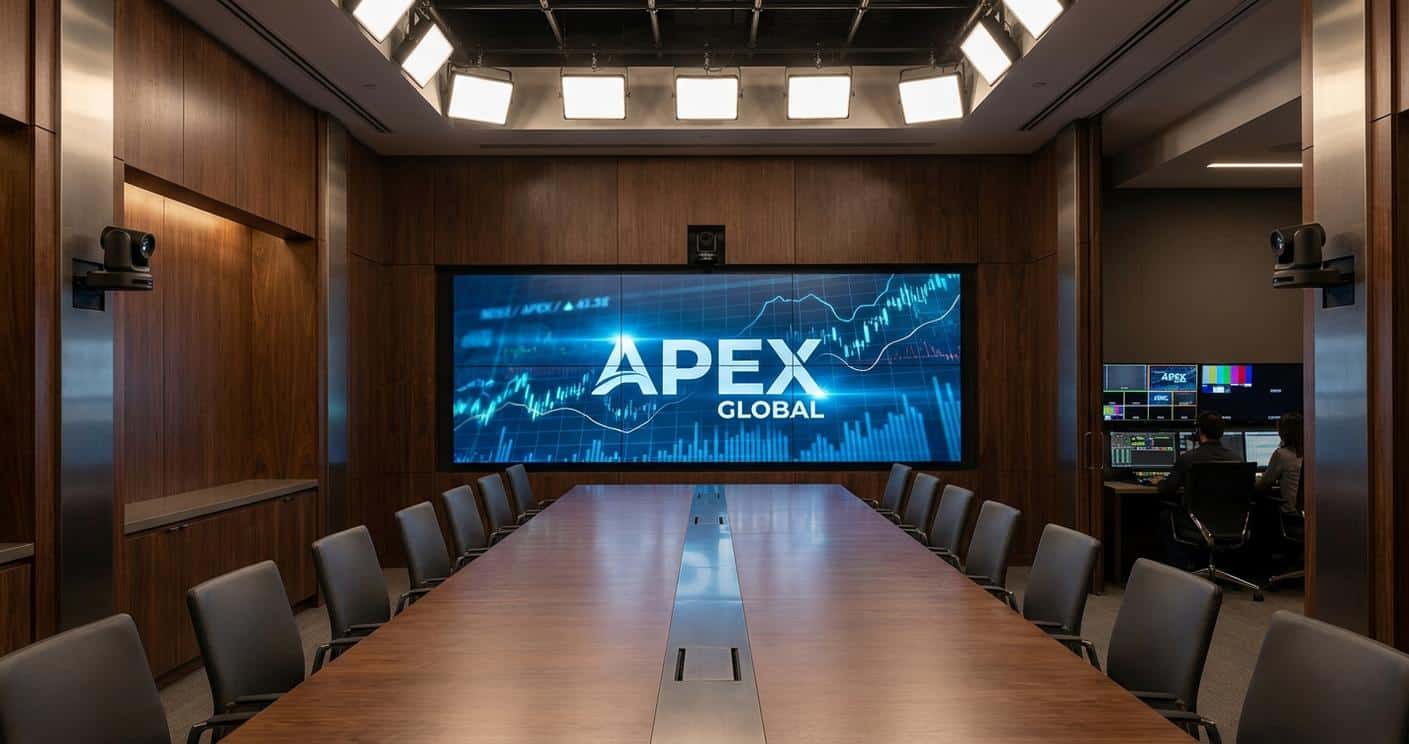
The paradigm of corporate communication has fundamentally shifted. High-stakes events like all-hands meetings, shareholder briefings, product launches, and executive town halls can no longer be entrusted to consumer-grade webcam solutions. The expectation from stakeholders, employees, and clients is a broadcast-quality experience that reflects brand professionalism and ensures message clarity. Simply placing a high-resolution webcam on a tripod fails to address the complex requirements of professional live production. Transforming a standard boardroom into a broadcast-ready studio involves a strategic integration of professional hardware, resilient network architecture, and robust transport protocols. This is not about incremental upgrades; it is about architecting a complete production ecosystem capable of delivering flawless, high-impact B2B streaming events.
This technical guide moves beyond superficial advice and details the core infrastructure required to achieve this transformation. We will dissect the signal flow from acquisition to delivery, analyze the critical transport protocols that guarantee stream integrity, and outline the network configurations necessary to support professional production workflows. The focus is on building a reliable, scalable, and versatile system that serves both internal communication needs and external, high-visibility hybrid events. This framework empowers enterprises to take full control of their messaging, ensuring every live-streamed event is executed with the precision and quality of a professional broadcast.
Foundational Infrastructure: Signal Flow and Core Hardware
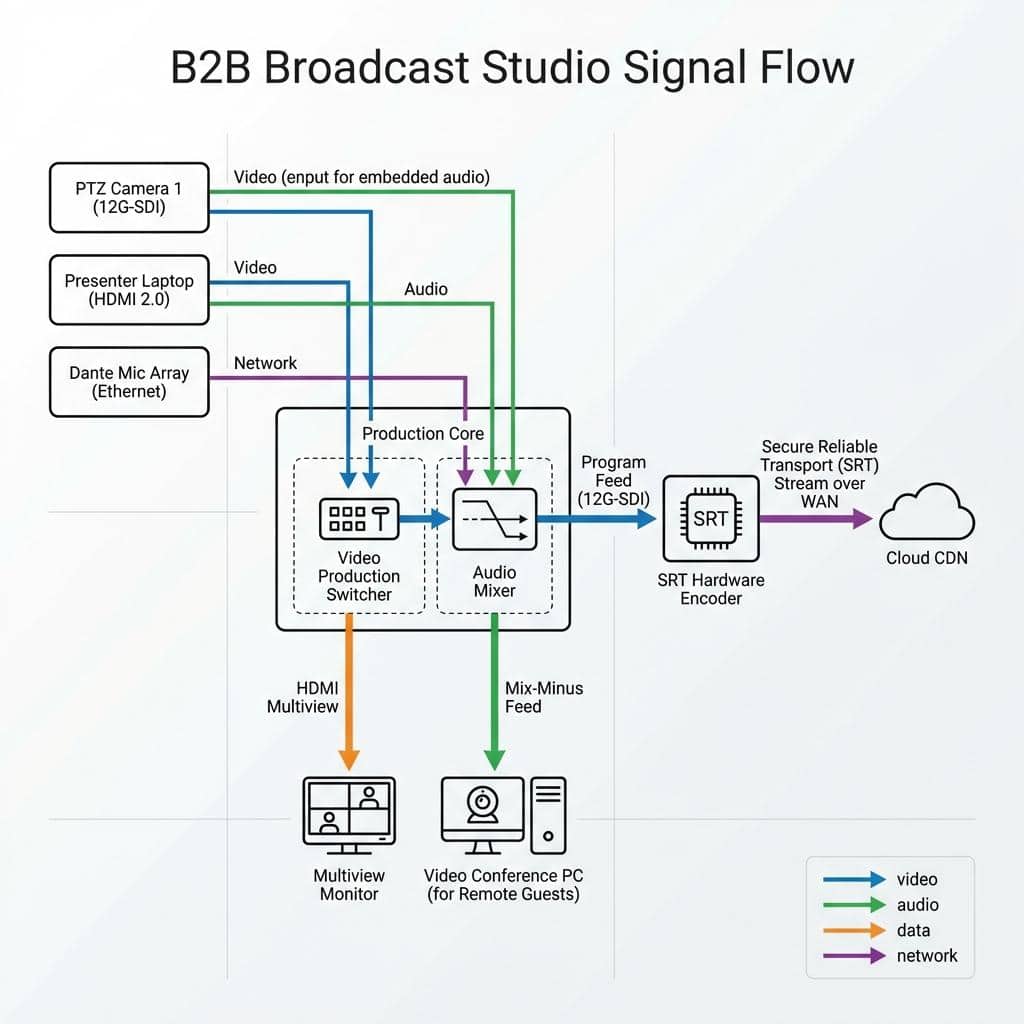
The foundation of any broadcast studio is the physical hardware and the logical signal flow that connects it. This core infrastructure dictates the quality of the raw audio and video, the flexibility of the production, and the overall reliability of the system. Transitioning from a simple webcam setup requires a complete re-evaluation of every component in the chain, from the lens of the camera to the inputs on the video switcher.
Camera and Acquisition Systems
The primary point of failure in most corporate streaming setups is the image acquisition device. Professional productions demand cameras that offer granular control and pristine image quality. We recommend moving to Pan-Tilt-Zoom (PTZ) cameras or dedicated studio cameras. High-quality PTZ cameras with 1-inch sensors provide excellent low-light performance and optical zoom capabilities far exceeding digital equivalents. Control is managed via protocols like VISCA over IP, allowing a single operator to manage multiple camera angles from a control surface. For connectivity, the choice is between baseband video via Serial Digital Interface (SDI) and IP-based workflows using Network Device Interface (NDI). 12G-SDI is the standard for uncompressed 4K UHD video at 60 frames per second over a single coaxial cable, offering maximum signal integrity and near-zero latency, which is critical for live production environments. Conversely, NDI allows for video, audio, control, and power to be sent over a standard Gigabit Ethernet network. This simplifies cabling but requires a carefully managed network infrastructure to prevent packet loss and jitter.
Audio Architecture for Clarity and Control
Audio is arguably more critical than video for corporate communications. A dropped frame may go unnoticed, but unintelligible audio will derail a presentation instantly. Integrated laptop or webcam microphones are inadequate for boardroom environments due to poor acoustics and ambient noise. A professional audio architecture includes multiple components. Ceiling-mounted microphone arrays with beamforming technology can capture clear audio from participants around a large table. For presenters, wireless lavalier or handheld microphone systems provide consistent audio levels regardless of movement. All audio sources should be routed into a dedicated audio mixer. This is non-negotiable. An audio mixer allows an operator to apply equalization (EQ) to enhance vocal clarity, compression to manage dynamic range, and noise gating to eliminate background noise. For hybrid events with remote participants, the mixer is used to create a mix-minus feed, which sends all audio to the remote guests except for their own, preventing echo and feedback. For IP-based audio, Dante (Digital Audio Network Through Ethernet) is the industry standard, allowing for uncompressed, multi-channel audio routing over a standard Ethernet network with sub-millisecond latency.
The Central Nervous System: Video Switching and Routing
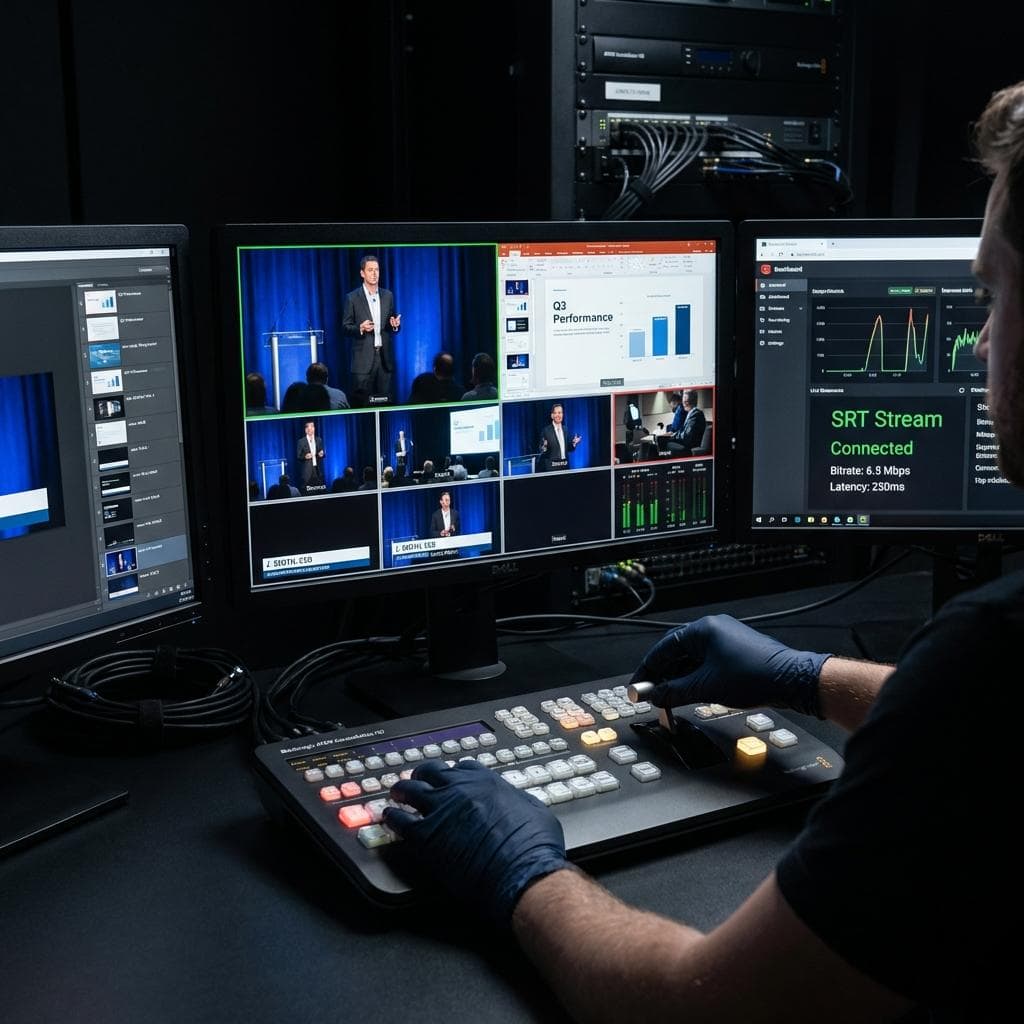
The heart of the boardroom studio is the production switcher. This device takes multiple video inputs, such as cameras, presentation laptops, and graphics feeds, and allows an operator to switch between them seamlessly for the live program feed. Professional switchers offer multiple inputs (both SDI and HDMI 2.0) and outputs. Key outputs include the main Program feed that goes to the encoder, an Aux (auxiliary) output for feeding in-room confidence monitors or presenter notes, and a Multiview output. The Multiview is essential for the operator, displaying all inputs, a preview window for cueing the next shot, and the live program feed on a single monitor. Advanced functions include hardware-based keyers for overlaying lower-third graphics and logos, DVE (Digital Video Effects) for creating picture-in-picture effects for remote presenters, and programmable macros that allow complex multi-step sequences to be executed with a single button press.
The Encoding and Transmission Pipeline
Once a pristine audio and video signal is produced by the switcher, it must be compressed (encoded) and transported (transmitted) to the distribution platform or Content Delivery Network (CDN). This stage is where stream reliability and quality are defined. The choices made regarding codecs, protocols, and encoding workflows directly impact the viewer’s experience and the stability of the entire broadcast.
Selecting the Right Codec: H.264 vs. H.265 (HEVC)
The codec is the algorithm used to compress video data. The long-standing industry standard is H.264, also known as Advanced Video Coding (AVC). It offers excellent quality and is universally compatible with virtually every playback device and platform. For 1080p30 streaming, a constant bitrate (CBR) of 4-6 Mbps using H.264 is standard practice. However, for 4K UHD streaming, H.264 becomes inefficient. This is where H.265, or High Efficiency Video Coding (HEVC), becomes essential. H.265 offers approximately 50% better compression efficiency than H.264, meaning it can deliver the same quality at half the bitrate, or significantly higher quality at the same bitrate. For a 4K30 stream, H.265 can deliver excellent quality at 15-20 Mbps. The trade-off is higher computational complexity, requiring more powerful encoding hardware, and less universal native playback support, though this is rapidly improving.
Transport Protocols: From RTMP to SRT
The transport protocol is the method used to send the encoded video data over a network. For years, the standard was RTMP (Real-Time Messaging Protocol). While still widely used for ingest by CDNs, RTMP is based on TCP (Transmission Control Protocol) and performs poorly over networks with packet loss or fluctuating latency. It has no native mechanism for recovering lost packets, which can lead to buffering and stream failure. The modern professional standard for stream contribution is SRT (Secure Reliable Transport). SRT is an open-source protocol that addresses the shortcomings of RTMP for professional use cases. It operates over UDP (User Datagram Protocol) but includes its own packet loss recovery mechanism based on ARQ (Automatic Repeat reQuest). This allows SRT to maintain a stable, low-latency stream even over unreliable public internet connections. It also includes AES-128/256 bit encryption, securing the content in transit. For internal video transport over the Local Area Network (LAN), NDI remains a powerful tool, but SRT is the superior choice for sending the final program feed out to the wider internet.
On-Premise vs. Cloud Encoding and Transcoding
Encoding can be handled by dedicated on-premise hardware encoders or through cloud-based services. Hardware encoders from manufacturers like Haivision, AJA, or Matrox offer maximum reliability and the lowest possible latency. These devices are purpose-built for encoding and are a staple in professional broadcast environments. For maximum scalability and reach, a cloud-based workflow is often employed. The on-premise hardware encoder sends a high-quality, single-bitrate SRT stream to a cloud media service like AWS Elemental MediaLive or Wowza Streaming Cloud. This service then transcodes the stream in real-time, creating multiple lower-bitrate versions. This process, known as creating an Adaptive Bitrate (ABR) ladder, allows viewers to receive the best possible quality stream their individual network connection can support, minimizing buffering and maximizing audience accessibility.
Network Architecture and Hybrid Event Integration
The performance of all IP-based video and audio systems depends entirely on the underlying network infrastructure. A corporate network designed for email and web browsing is not inherently suited for the demands of real-time, high-bitrate media traffic. Furthermore, seamless integration with Unified Communications (UC) platforms is essential for modern hybrid events.
Building a Resilient Network for Live Production
To ensure stable operations, all production equipment should reside on its own dedicated Virtual Local Area Network (VLAN). This logically isolates the time-sensitive video and audio traffic from general corporate data, preventing network congestion from impacting the stream. Within this VLAN, Quality of Service (QoS) policies must be implemented. QoS prioritizes media packets (identified by protocols like NDI and SRT) over less critical data, ensuring they are not delayed or dropped during periods of high network traffic. Bandwidth planning is critical. A single 4K NDI stream can consume upwards of 300 Mbps. An SRT contribution stream might require 20-30 Mbps of egress bandwidth. A good rule of thumb is to provision at least double the required sustained bandwidth to handle traffic peaks. The network hardware itself must be up to the task. This means using managed gigabit or 10-gigabit switches with sufficient backplane capacity and Power over Ethernet (PoE/PoE+) capabilities to power PTZ cameras and Dante audio devices directly over the network cable.
Integrating with Enterprise UC Platforms (Teams, Zoom, Webex)
A common requirement is to bring the high-quality program feed into a UC platform like Microsoft Teams, Zoom, or Cisco Webex for interactive sessions with remote presenters or internal audiences. The most direct method is to use a device that converts an SDI or HDMI program output into a standard USB webcam source, such as a Blackmagic Web Presenter 4K. This allows the entire broadcast production to appear as a simple webcam within the UC application. For more advanced workflows, NDI provides a powerful solution. By using NDI’s Virtual Input tool on the meeting computer, the NDI program feed from the switcher can be selected as the primary video source in Teams or Zoom. This maintains full quality over the LAN before it is ingested by the UC platform’s own compression algorithm. This setup allows for a true hybrid event, where the main program is streamed in high quality via SRT to a CDN for a public audience, while a separate feed is managed through the UC platform for interactive participants.
Redundancy and Failover Strategies
For mission-critical events, redundancy is not optional. Hardware redundancy involves having backup systems in place, such as a second encoder ready to take over if the primary fails. Network redundancy is achieved by using bonded internet solutions. These devices can combine multiple internet connections (e.g., two fiber lines, or one fiber and a 5G cellular connection) into a single, more resilient pipeline. If one connection fails, traffic is automatically routed over the remaining active connections. For stream path redundancy, a common strategy is to send two identical SRT streams from the encoder over two different network paths to the cloud ingest point. Many cloud platforms and CDNs can be configured for hitless failover, meaning if the primary stream is interrupted, the platform automatically and instantly switches to the backup stream with no disruption visible to the audience.
By investing in this level of technical infrastructure, an organization moves far beyond the limitations of simple web conferencing. It transforms its key spaces into powerful communication hubs, capable of producing professional, engaging, and resilient live events that protect and enhance the brand’s reputation in an increasingly digital-first B2B landscape. Engaging with a technical partner like Live Streaming Studio ensures that these complex systems are designed, integrated, and managed to broadcast-industry standards, guaranteeing a successful outcome for every critical event.