
 March 26, 2026 by Editor |
Executive Training at Scale: A Technical Blueprint for Hybrid B2B Production
Delivering high-impact executive training to a geographically dispersed team of regional HR directors presents a significant logistical and technical challenge. Standard enterprise video conferencing tools, while suitable for routine meetings, lack the production quality, signal integrity, and robust control required for executive-level engagement. The objective is not merely to transmit a video feed; it is to replicate the polish and authority of a main-stage keynote across multiple locations simultaneously. This requires a shift in mindset from simple webcasting to a broadcast-level production methodology, integrating professional-grade hardware, resilient network protocols, and a scalable distribution architecture. For corporate event planners and IT directors, executing this successfully hinges on a deep understanding of signal flow, encoding standards, and enterprise-grade delivery mechanisms. This article provides a technical framework for deploying a professional streaming solution capable of connecting a central training hub with numerous regional offices, ensuring a flawless and interactive experience for all participants.
Architecting the Central Production Hub for Signal Integrity
The foundation of any multi-site training event is the central production hub. This is not just a room with a camera; it is a dedicated production environment engineered for reliability and quality control. The entire workflow, from signal acquisition to contribution encoding, must be designed to broadcast standards to guarantee a professional output.
Multi-Camera Acquisition and Baseband Signal Routing
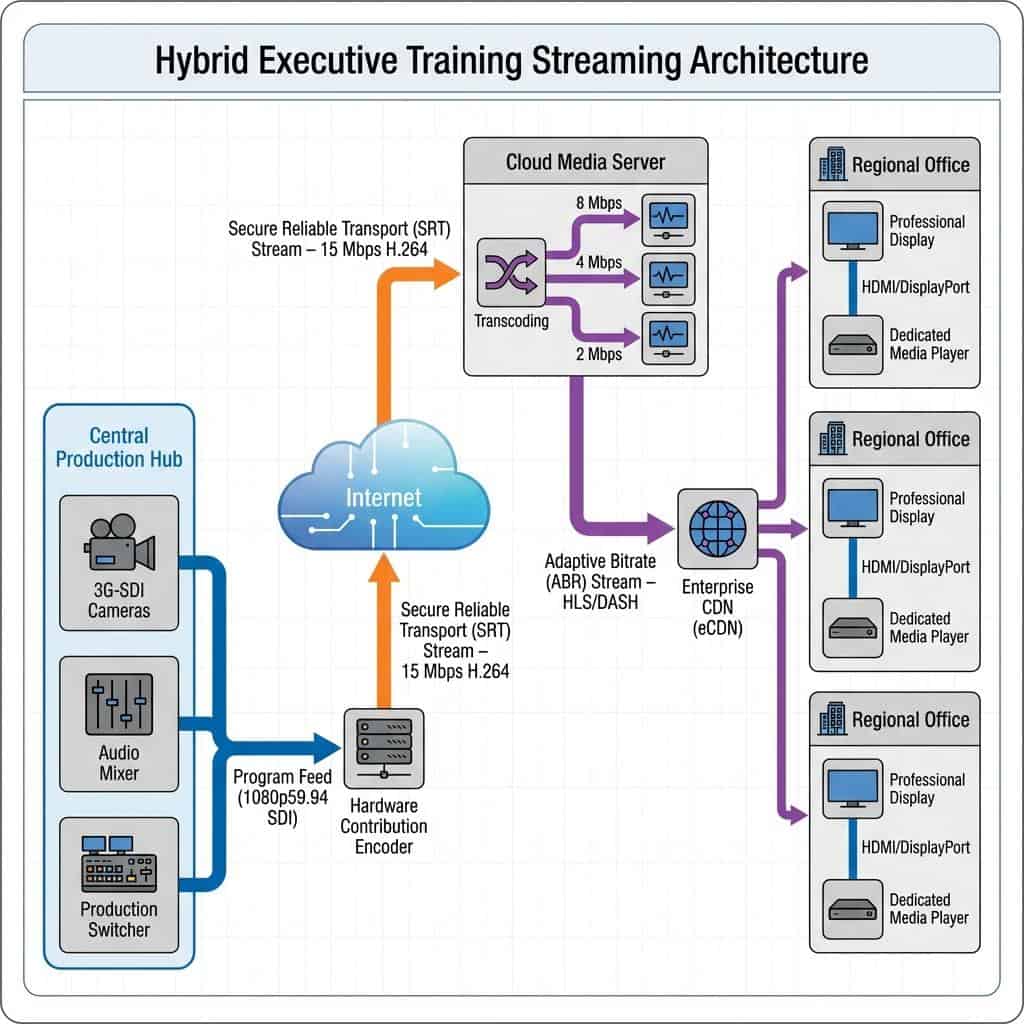
High-quality training begins with pristine image and audio acquisition. For executive presentations, a multi-camera setup is non-negotiable. A typical configuration includes a minimum of three cameras: a wide shot of the stage or presentation area, a tight shot on the primary speaker, and a third camera for audience shots or a secondary angle. Professional PTZ (Pan-Tilt-Zoom) cameras offer remote operational control, while manned studio cameras provide superior cinematic quality. The critical technical decision is the signal transport from camera to switcher. While HDMI is common, the professional standard is Serial Digital Interface (SDI), specifically 3G-SDI or 12G-SDI for higher resolutions. SDI offers significant advantages in a production environment, including longer cable runs without signal degradation (up to 100 meters), locking BNC connectors to prevent accidental disconnection, and the ability to embed timecode and multiple audio channels. All video signals should be standardized to a single resolution and frame rate, typically 1920×1080 at 59.94 frames per second (1080p59.94), before entering the video switcher to prevent synchronization issues. Audio acquisition is equally critical. Presenters should be fitted with professional wireless lavalier or headset microphones, operating in a properly coordinated UHF frequency band to avoid interference. All audio signals should be routed as balanced analog audio via XLR or as digital audio embedded within the SDI signal path to a dedicated audio mixing console.
The Production Control Room Core: Switching, Graphics, and Encoding
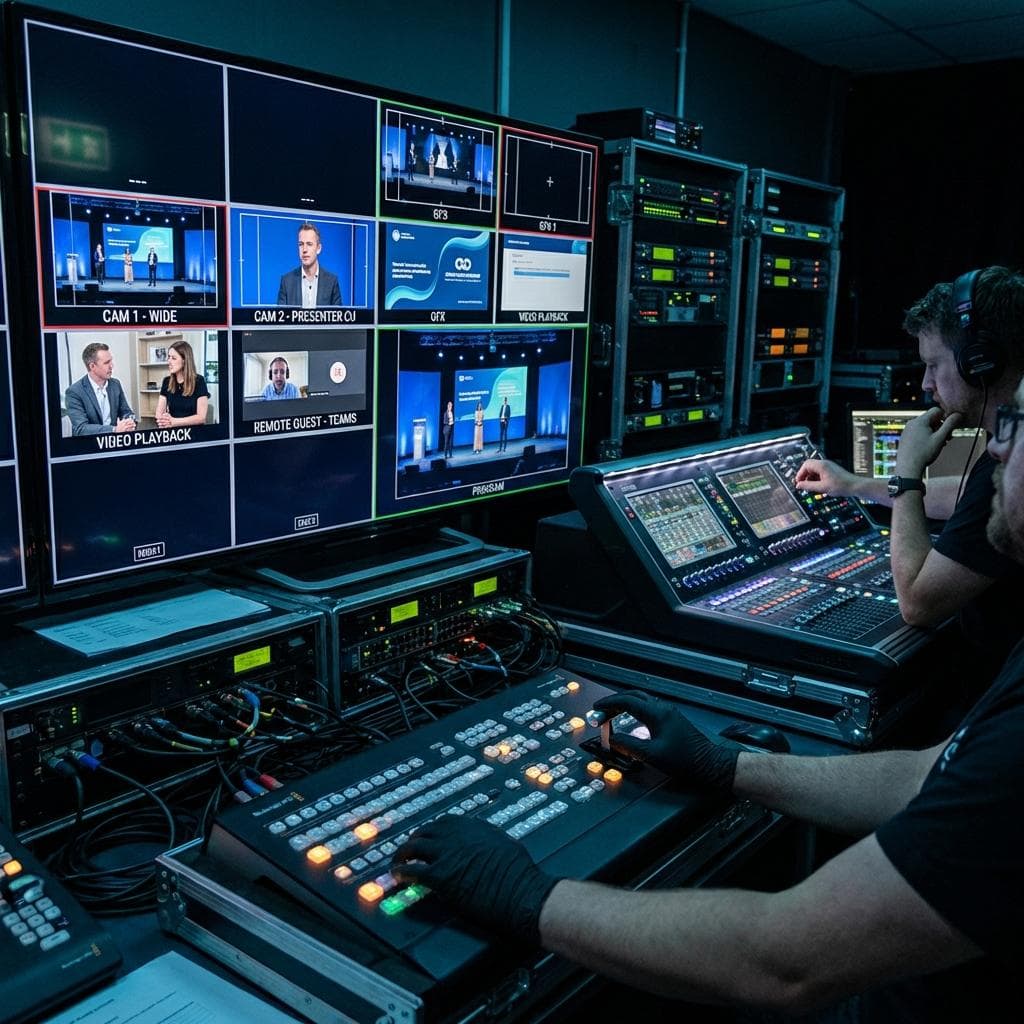
The heart of the hub is the Production Control Room (PCR). Here, all incoming video and audio signals converge for mixing and processing. A production switcher, such as a Blackmagic Design ATEM Constellation or a Ross Carbonite, serves as the central routing and mixing engine. This allows a technical director to seamlessly cut between camera angles, integrate pre-produced video roll-ins, and key downstream graphics like speaker titles and corporate branding. The output of the switcher is the main Program Feed. This feed, along with individual camera feeds known as ISO (isolated) recordings, should be recorded locally on broadcast-grade recorders like an AJA Ki Pro or a HyperDeck Studio for archival and post-production purposes. The final Program Feed is then sent to the contribution encoder. This is a pivotal component responsible for compressing the baseband video signal for transport over an IP network. For this application, a hardware encoder from a manufacturer like Haivision, AJA, or Kiloview is strongly recommended over software solutions due to its stability and processing power. The encoder must be configured to use a robust transport protocol. While RTMP (Real-Time Messaging Protocol) was once the standard, it is ill-suited for high-quality contribution over the public internet due to its reliance on TCP and its inability to gracefully handle packet loss. The modern broadcast standard for contribution is SRT (Secure Reliable Transport). SRT is a UDP-based protocol that provides low-latency streaming with advanced error correction, making it exceptionally resilient to network jitter and packet loss, ensuring the pristine Program Feed arrives at the cloud distribution point intact.
Designing a Scalable and Secure Distribution Infrastructure
Once the high-quality SRT feed leaves the production hub, the next challenge is delivering it reliably and at scale to every regional office. This requires a multi-layered cloud and on-premise architecture that can handle transcoding, security, and the potential for massive internal network traffic spikes. Relying on a single public live-streaming platform is not a viable enterprise solution.
Cloud Media Ingest, Transcoding, and Packaging
The contribution encoder sends its single, high-bitrate (e.g., 15-20 Mbps H.264 or H.265) SRT feed to a cloud-based media server ingest point. This server, running on a platform like Amazon Web Services (AWS) or Microsoft Azure with software like Wowza Streaming Engine, serves two primary functions. First, it provides a geographically stable and redundant target for the SRT stream. Second, and most importantly, it performs transcoding. The single 15 Mbps feed is converted in real-time into multiple lower-bitrate renditions (e.g., 8 Mbps, 4 Mbps, 2 Mbps, 1 Mbps). This collection of streams is packaged for Adaptive Bitrate (ABR) delivery using protocols like HLS (HTTP Live Streaming) or MPEG-DASH. ABR is crucial because it allows the video player at each regional office to automatically select the highest quality stream that its local network conditions can support, preventing buffering and ensuring a smooth playback experience for everyone, regardless of their office’s internet performance.
Enterprise Content Delivery Network (eCDN) for Internal Bandwidth Management
If fifty regional offices simultaneously pull a 4 Mbps video stream from the public internet, the collective demand on the corporate Wide Area Network (WAN) can be catastrophic, potentially disrupting other critical business operations. This is where an Enterprise Content Delivery Network (eCDN) becomes essential. An eCDN solution from vendors like Hive, Ramp, or Kollective is deployed within the corporate network. Instead of each individual viewer in an office pulling the stream from the cloud, the eCDN agent designates one peer to download the video segments. It then efficiently distributes those segments to all other viewers within the same local office network using a peer-to-peer or local caching methodology. This means only one instance of the stream traverses the expensive corporate internet link per office, while internal distribution happens over the high-speed Local Area Network (LAN). This dramatically reduces external bandwidth consumption and is a mission-critical component for any large-scale internal streaming event.
The Regional Endpoint: Ensuring a Professional and Interactive Experience
The final link in the chain is the viewing experience at the regional offices. All the upstream production effort is wasted if the playback environment is substandard. A professional setup requires more than just sharing a link and having directors watch on their laptops.
Managed Playback Environments and Return Feeds
Each regional office should have a dedicated conference room equipped with a large professional display or projector. The HLS or DASH stream should be played back on a dedicated media player device, such as an Intel NUC or a BrightSign player, hard-wired to the network. This provides a stable, full-screen experience that is far more reliable than a web browser, which can be subject to OS updates, pop-ups, and user error. To facilitate interactivity, a separate system must be established for bi-directional communication. A common and effective solution is to use a standard video conferencing platform like Microsoft Teams or Zoom as a return feed mechanism. A dedicated camera, microphone, and display are set up in each regional office. This allows regional directors to queue up to ask questions. Back at the central production hub, this return video conference feed is brought into the main production switcher as another video source. When a regional director is selected to speak, the technical director can switch their video feed into the main Program output, allowing all other offices to see and hear them. This creates a fully interactive hybrid event, seamlessly blending the one-to-many broadcast with many-to-many collaboration.
Redundancy and Failover Strategies for Zero Downtime
For executive-level training, there is no tolerance for failure. Redundancy must be built into every layer of the architecture. At the production hub, this means having a secondary, parallel contribution encoder running on a separate internet connection, ideally from a different ISP or a bonded cellular solution (e.g., LiveU). This secondary encoder should be sending an identical SRT feed to a secondary ingest point in the cloud. In the event of a primary encoder or network failure, a system administrator can instantly switch to the backup stream. At the regional offices, having a secondary internet connection, such as a 5G/LTE cellular backup, can provide a failover path if the primary office network fails. All systems should be monitored in real-time using network analysis and Quality of Service (QoS) tools to proactively identify and address potential bottlenecks before they impact the viewer experience.
Ultimately, scaling executive training through professional streaming is a complex broadcast engineering task. It demands meticulous planning across the entire signal chain, from the camera lens in the production hub to the display screen in the regional office. By architecting a solution with a focus on signal integrity using SDI, contribution reliability via SRT, distribution scalability with ABR and eCDNs, and interactivity through managed return feeds, organizations can deliver a consistent, engaging, and technically flawless training experience that connects leadership and reinforces corporate messaging, no matter the distance.