
 March 23, 2026 by Editor |
The quarterly financial results announcement is a cornerstone of corporate communications. For enterprise decision-makers, AV professionals, and IT directors, the technical execution of these live-streamed events is a high-stakes endeavor where precision and reliability are non-negotiable. Simply displaying a static PowerPoint presentation over a video feed is no longer sufficient to engage a discerning audience of investors, analysts, and stakeholders. The challenge lies in transforming raw, complex financial data into clear, broadcast-quality graphical information, rendered and composited in real-time, without compromising the stability or security of the production. This requires a deep understanding of broadcast engineering principles, data integration protocols, and IP-based video workflows. A failure in the graphics system, a data error, or a synchronization issue can instantly undermine the credibility of the entire presentation.
Successfully integrating live infographics into a financial results stream is not a simple post-production task; it is a complex, real-time broadcast operation. It demands a robust infrastructure that can securely ingest data from enterprise resource planning (ERP) systems or financial databases, parse it through a middleware layer for validation, and feed it into a real-time 3D graphics rendering engine. This entire process must happen with sub-second latency, synchronizing perfectly with the live camera feeds of the CEO and CFO. This article provides a technical deep-dive into the architecture, workflows, and protocols required to build and execute a flawless, data-driven live stream for financial communications, focusing on the enterprise-grade solutions that guarantee precision and performance under pressure.
The Core Infrastructure: Signal Flow and Data Integration Architecture
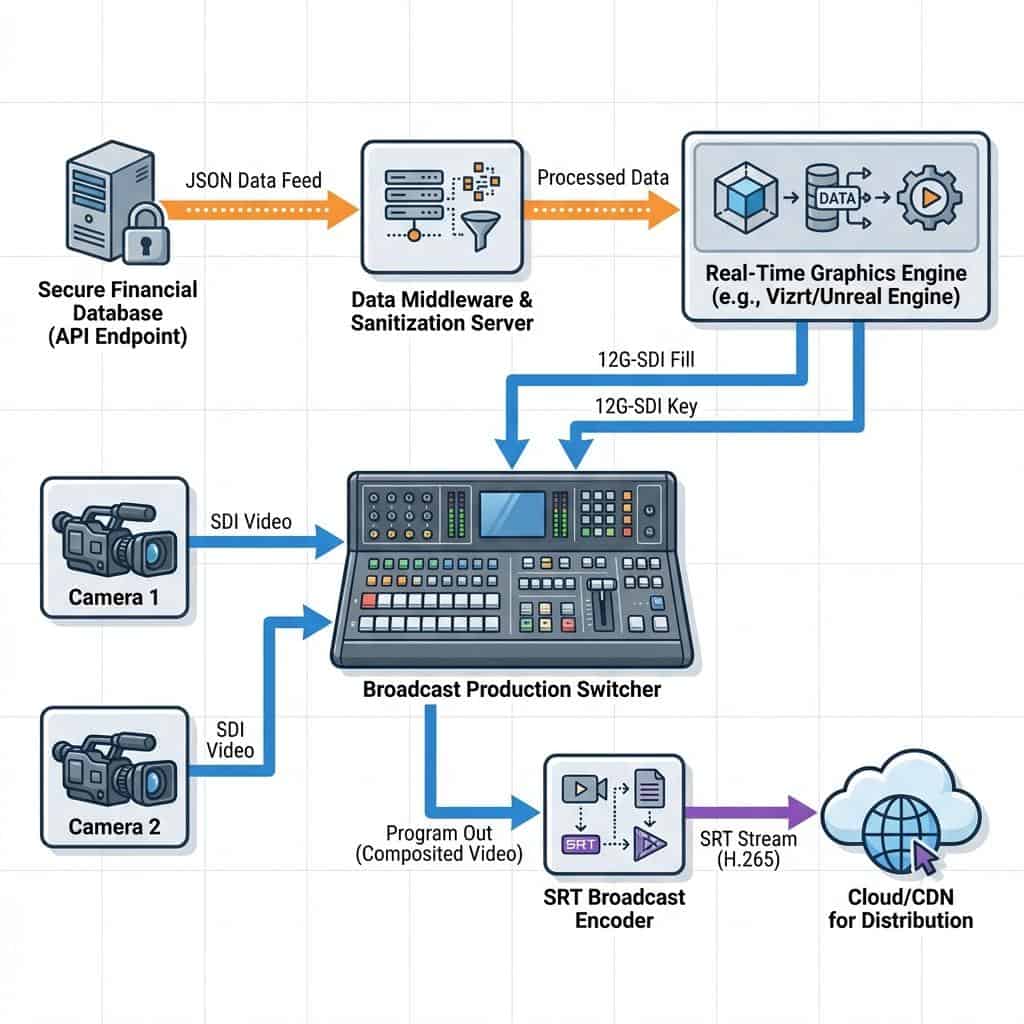
The foundation of any real-time data visualisation workflow is the architecture that governs how data and video signals move through the production system. This is not merely about connecting a laptop’s HDMI output; it involves a carefully planned chain of specialised hardware and software designed for broadcast reliability. The goal is to create a seamless path from a secure data source to the final composited program output, with multiple points of control, monitoring, and redundancy.
Choosing the Right Graphics Engine
The heart of the system is the real-time graphics engine, a powerful computer or hardware unit responsible for rendering the visuals. For enterprise-level financial streams, these engines fall into two primary categories. First, hardware-based broadcast graphics platforms like Vizrt Trio and Ross Video XPression are industry standards in television news and sports production. They offer unparalleled stability, dedicated hardware for rendering, and deep integration with production automation systems. They typically output video via Serial Digital Interface (SDI), providing a discrete Fill and Key signal. The Fill signal is the full-color graphic, while the Key signal (also known as alpha or matte) is a grayscale signal that tells the production switcher which parts of the Fill signal are transparent. This method allows for perfect layering of graphics over live video with clean, anti-aliased edges. Second, software-based solutions are gaining significant traction. Tools like CasparCG (an open-source platform), Singular.live (a cloud-based platform), and even real-time 3D creation tools like Unreal Engine offer immense flexibility and can be run on Commercial Off-The-Shelf (COTS) hardware. These often leverage IP-based outputs like Network Device Interface (NDI) or can be configured with specific video I/O cards (from vendors like Blackmagic Design or AJA) to generate the traditional SDI Fill and Key signals.
Data Ingress and Sanitization
Getting live data into the graphics engine requires a secure and reliable pathway. The most robust method is through Application Programming Interface (API) calls to a controlled data source, such as a corporate financial database or a secure cloud endpoint. This prevents manual entry errors and allows for last-minute data updates. A critical component in this workflow is a data middleware layer. This software acts as a bridge between the raw data source and the graphics engine. Its job is to ingest the data (often in formats like JSON or XML), parse it to extract the required figures, sanitise it to ensure it contains no malicious code or formatting errors, and then format it into a simple structure that the graphics engine’s templates can read. This middleware can be a custom-developed application or a feature within advanced graphics platforms. It also serves as a crucial validation point where an operator can approve data before it is pushed to the live graphics engine, preventing incorrect figures from ever reaching the screen.
Signal Routing: From Graphics Engine to Production Switcher
Once the graphics are rendered, they must be integrated with the live camera feeds. In a traditional broadcast environment, this is handled using 12G-SDI or 6G-SDI for 4K/UHD productions. The graphics engine sends two separate SDI signals, Fill and Key, to two dedicated inputs on a production switcher (like a Ross Carbonite or Grass Valley K-Frame). The switcher’s downstream keyer (DSK) or upstream keyer then uses the Key signal to perfectly composite the graphic over the program video feed from the cameras. This hardware-based approach is extremely low-latency and reliable. In modern IP-based production environments, NDI is the dominant protocol. A graphics engine can send a single NDI stream over a standard 1-Gigabit or 10-Gigabit Ethernet network. This NDI stream contains the Fill and Key information embedded within it, eliminating the need for two separate physical cables and simplifying routing. The production switcher, also NDI-enabled, can then receive this stream and perform the keying operation. While NDI offers incredible flexibility, it requires a meticulously planned network infrastructure with managed switches configured for Quality of Service (QoS) to prioritize the video traffic and prevent packet loss.
Production Workflow: Execution and Control in a Live Environment
A robust infrastructure is only half the battle. The execution of graphics during a live financial broadcast must be precise and fluid. This is managed through a combination of skilled operators, intelligent control surfaces, and workflow automation that synchronizes the actions of the entire production team. The workflow must be designed to be both responsive for ad-hoc requests and structured enough to follow a detailed run-of-show document.
Operator Control and Automation
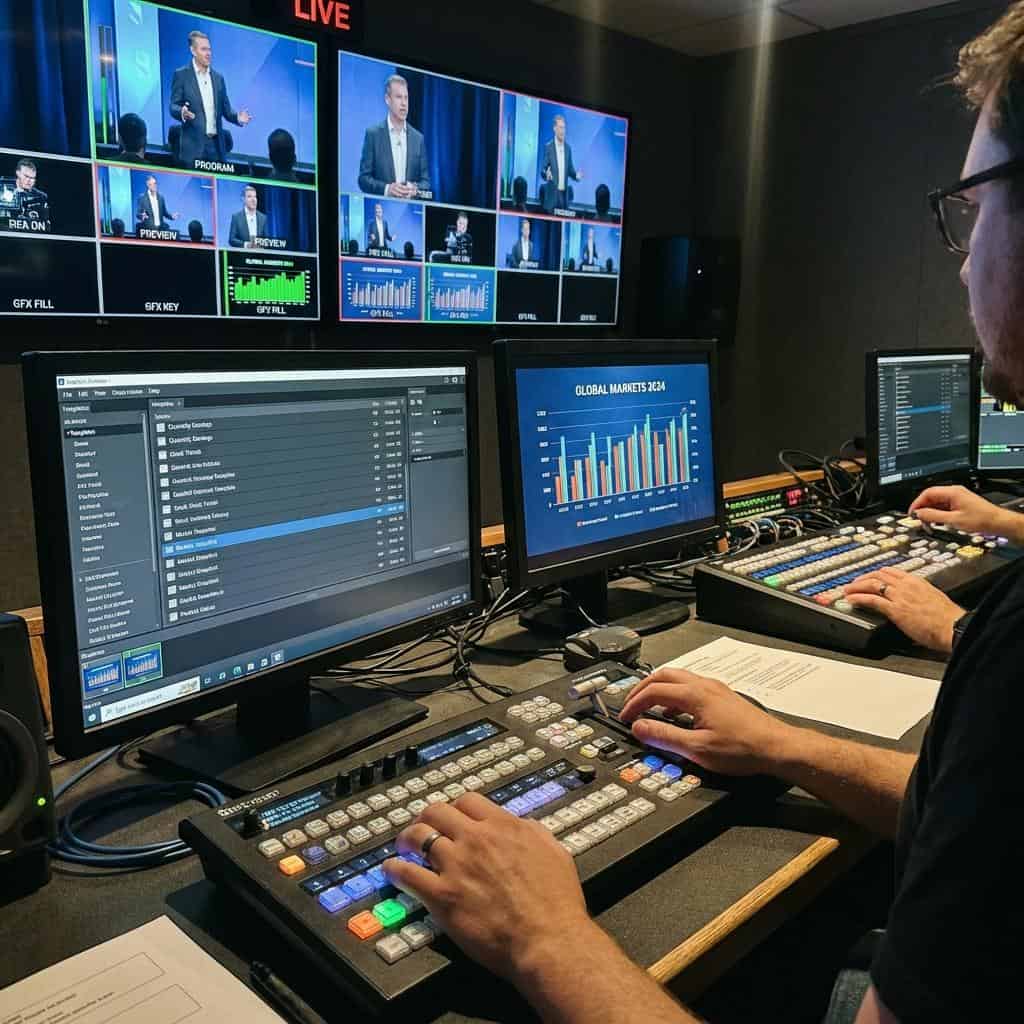
A dedicated graphics operator is essential for a high-stakes financial stream. This role is not simply “playing back” slides. The operator uses a custom user interface, often provided by the graphics engine software, to select, preview, and trigger specific graphic templates. These interfaces show real-time data feeds and allow the operator to push updates to graphics that are already on-air. For instance, if a key financial metric needs to be highlighted, the operator can trigger an animation within the template without taking the graphic off-air. For more complex shows, these actions can be automated. Production automation systems can be programmed to trigger graphics based on cues from the show script or actions taken by the technical director on the production switcher. This ensures that lower-third titles for speakers appear exactly when their microphones are opened, or that a full-screen data chart is shown precisely when the CFO references it. This level of integration is often achieved using protocols like General Purpose Interface (GPI) triggers or more modern IP-based protocols that allow the switcher, audio mixer, and graphics engine to communicate directly.
Synchronization and Latency Management
In any multi-source live production, ensuring all video and audio signals are perfectly synchronized is paramount. This is achieved using a master sync generator that provides a reference signal, known as genlock, to all broadcast equipment, including cameras, switchers, and graphics systems. This ensures every piece of gear is operating on the exact same clock cycle, preventing frame tearing or timing drifts. In IP-based workflows using protocols like NDI or SMPTE ST 2110, timing is managed by the Precision Time Protocol (PTP), which synchronizes all devices on the network to a master clock with microsecond accuracy. Latency, the inherent delay from processing and transport, must also be managed. A graphics engine will have a certain processing delay (e.g., 1-2 frames). The main camera feeds might also have a slight delay. Audio processing introduces its own latency. A professional production environment uses frame synchronizers and audio delay processors to ensure that when a CEO speaks, their lips move in perfect sync with the audio the audience hears and the lower-third graphic identifying them appears at the exact same moment.
Encoding and Distribution for Multi-Platform Delivery
The final stage of the production chain involves encoding the final program feed, complete with composited graphics, and transporting it to the content delivery network (CDN) for distribution to the global audience. The choices made at this stage directly impact the clarity of the financial data and the reliability of the stream itself, particularly for hybrid events where stakeholders are viewing on platforms like Microsoft Teams or Zoom alongside the public web stream.
Encoding for Data-Rich Content
Live video encoding is the process of compressing the video signal for transmission over the internet. For content rich with sharp text and fine lines found in financial infographics, the encoding settings are critical. While H.264 is still a widely used codec, H.265, also known as High Efficiency Video Coding (HEVC), is often superior. H.265 can deliver the same quality as H.264 at roughly half the bitrate, or significantly higher quality at the same bitrate. This is crucial for maintaining the legibility of small text in charts and tables. Furthermore, selecting a higher encoding profile, such as High 4:2:2, can preserve more color information and detail compared to the more common 4:2:0 profile, further enhancing graphic clarity. A constant bitrate (CBR) strategy is typically recommended for live streams to ensure a stable connection to the CDN, with a target bitrate of 6-8 Megabits per second (Mbps) for a high-quality 1080p60 stream.
Secure and Reliable Transport Protocols
While Real-Time Messaging Protocol (RTMP) has been a long-standing standard, it is an aging technology with limitations, particularly over unreliable networks. For mission-critical financial streams, Secure Reliable Transport (SRT) is the modern successor. SRT is an open-source protocol that provides low-latency performance while also incorporating sophisticated error-correction to handle packet loss, which is common on the public internet. It can recover from significant network congestion without causing the video to buffer or fail. This makes it ideal for sending the primary feed from the production venue to a cloud transcoding service or directly to the CDN. For hybrid events, SRT can also be used to send a high-quality, low-latency feed to enterprise conferencing platforms, providing a much cleaner signal than a simple screen share. Alternatives like Zixi and Reliable Internet Stream Transport (RIST) offer similar enterprise-grade reliability features.
Redundancy and Failover Strategies
For a financial results broadcast, failure is not an option. A robust redundancy plan is essential. This starts with a 1+1 or N+1 configuration for all critical equipment. This means having a secondary, mirrored graphics engine, production switcher, and encoder running in parallel. If the primary unit fails, the system can switch to the backup instantly and seamlessly. This is often managed by a signal routing matrix and monitoring systems that can detect a signal loss and trigger an automatic failover. Network connectivity must also be redundant. The primary stream contribution should never rely on a single internet connection. A common strategy is to use two separate fiber internet providers, or a combination of fiber and a bonded cellular solution, which combines multiple cellular network connections into a single, highly reliable internet link. This ensures the stream can continue even if one of the network providers has an outage.
Actionable Implementation Roadmap for Enterprise Teams
Deploying a broadcast-grade system for live infographic integration requires careful planning and collaboration between production, AV, and IT departments. A phased approach ensures all technical requirements are met and thoroughly tested well before the day of the live event.
Pre-Production and Data Rehearsal
Weeks before the event, the entire data workflow must be tested end-to-end. This involves establishing a secure connection to the real data source or a staging database with realistic sample data. The graphics templates should be tested with a wide range of potential data inputs, including long names, large numbers, and negative values, to ensure they respond correctly and do not break. A full technical rehearsal, simulating the entire run-of-show, is non-negotiable. This is where data is pushed to the graphics engine in real-time to test system responsiveness and operator accuracy. The rehearsal should also include stress-testing the network by running other high-bandwidth applications to ensure QoS configurations are working as intended.
Network Infrastructure Considerations
The network is the backbone of any modern production. For workflows involving NDI or SRT, a dedicated and isolated production network is highly recommended. This prevents corporate network traffic from interfering with the time-sensitive video packets. The network should be built with managed switches that support IGMP snooping to efficiently manage multicast traffic from NDI sources. IT teams must calculate the total bandwidth requirements. A single 4K/UHD NDI stream can consume up to 400 Mbps, so a 10-Gigabit or higher network backbone is often necessary. For external streaming via SRT, IT must configure firewall rules to allow the protocol to pass through and ensure sufficient egress bandwidth is available, with headroom to spare for the redundant stream.
Ultimately, the successful integration of live data into financial streams elevates the communication from a simple presentation to an authoritative, engaging broadcast. It demonstrates a commitment to transparency and technological leadership. By investing in a robust architecture built on broadcast principles, leveraging secure data handling protocols, and executing with a disciplined production workflow, enterprises can deliver financial communications that are not only informative but also reflect the precision and professionalism of their brand.